With the video display question type, you can display a video clip to the respondent. To upload your video clip, click set video.
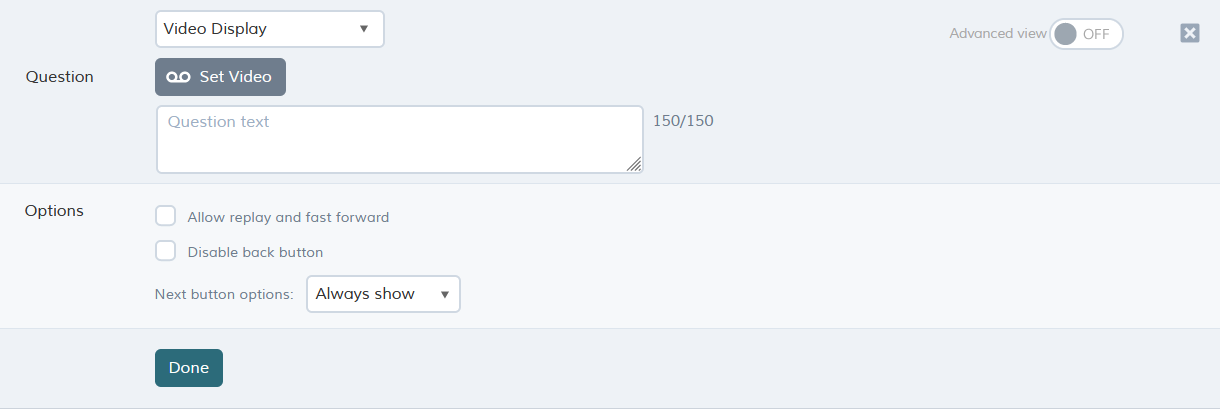
Question options
|
Option |
Description |
| Allow replay and fast forward |
Allows the respondent to play the video more than once, and fast forward (skip ahead) through it. QMob web surveys allow replay and fast forward by default. |
| Disable back button |
Prevents the respondent from going back to previous question. |
| Next button options |
Always show - Next button is shown right away. Delay for - Allows delaying of the Next button so it appears 'X' seconds after arriving at the question. |
If you select allow replay and fast forward, respondents will be able to play the video more than once, and fast forward (skip ahead) through it. The back button can be disabled on this question so that respondents can no longer go back to previous questions.
Note: QMob web surveys allow replay and fast forward by default.
You can remove the video clip (in order to upload a different one) by clicking remove video.
The video file format should be .mp4, which is compatible with all platforms.
The recommended format is:
- Video codec: H.264/MPEG-4 AVC Baseline Profile
- Audio codec: MPEG AAC (mp4a) Sample rate 44100 Hz. Stereo
Please pay attention to the file size of your video. We recommend using files below 30 MB as the video will be downloaded to each respondent's device as part of the project. If you use multiple video files, please ensure that the total size is below 50 MB.
You can use this this converter and choose the correct format.